
Use one Rekey Application to sign users in to another
GuideYou have two products and one set of users. Rather than asking people to keep a second password, you can let the second product offer “Sign in with the first”. An Application in Rekey does that: switch it on and it serves a discovery document, an authorize endpoint and a token endpoint, and any OpenID Connect client can use it the same way it would use Google.
The whole thing is four steps. Two of them are settings, one is a single HTTP call, and the last is whatever OIDC client library your other product already uses. For every scope, claim and error, and a working relying party in Node, see the step-by-step guide.
Step by step
Step 1
Switch the Application into a provider
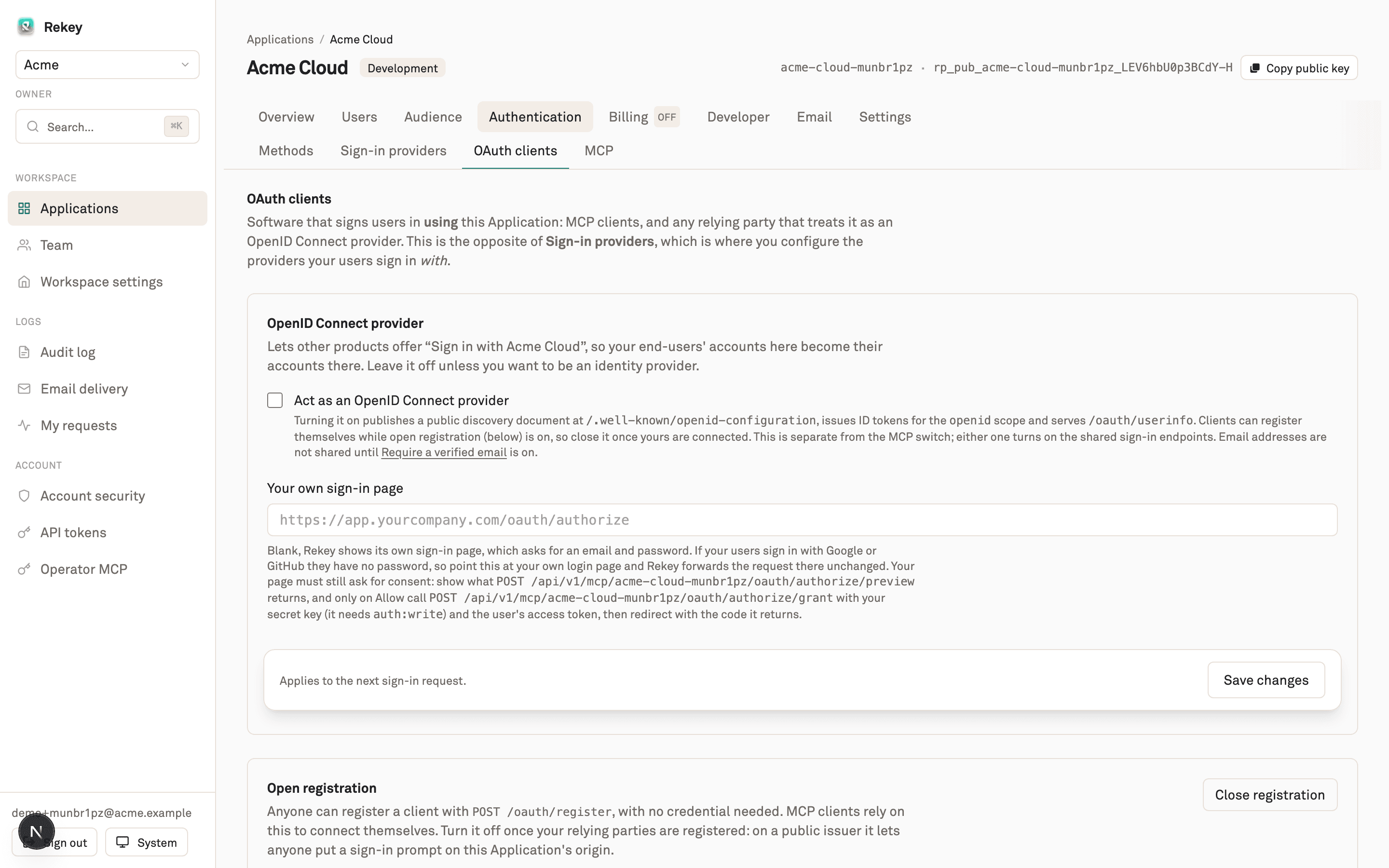
In the panel, open the Application, then Authentication → OAuth clients, and under OpenID Connect provider turn on Act as an OpenID Connect provider. That publishes an unauthenticated discovery document and starts issuing id_tokens for the openid scope.
Check it immediately. If this returns JSON, the Application is a provider and everything else in this guide will work.
Discovery
curl https://api.rekey.dev/api/v1/mcp/YOUR_SLUG/.well-known/openid-configuration
The response tells you the endpoints, the scopes this Application will grant, and that PKCE is required. Read scopes_supported now, because the next step is about one scope that might be missing from it.
Step 2
Decide whether you need the email claim
An Application only offers the email scope when Require a verified email is on, under Authentication → Methods, in Verification & sessions. This surprises people, so it is worth stating plainly: without that setting, discovery advertises openid profile and the ID token carries no email address.
The reason is that an id_token saying "email": "[email protected]" for an address nobody proved is an account takeover primitive at any relying party that keys on it, and relying parties routinely ignore email_verified. Rather than emit a claim we cannot stand behind, the Application does not offer the scope at all and says so in discovery.
If your relying party matches users by email
Step 3
Register the client
The other product needs a client_id. Registration is open by default, so one call gets you one. The redirect_uris you pass are an exact match allowlist: the value your product sends at sign-in time has to be character for character one of these.
Register
curl -X POST https://api.rekey.dev/api/v1/mcp/YOUR_SLUG/oauth/register \
  -H 'Content-Type: application/json' \
  -d '{
    "client_name": "Acme Dashboard",
    "redirect_uris": ["https://dashboard.acme.example/auth/callback"]
  }'
You get back a client_id and no client secret. That is not an omission. This Application issues public clients that authenticate with PKCE, and discovery says so with token_endpoint_auth_methods_supported: ["none"]. If your OIDC library insists on a secret, configure it as a public client instead of inventing a value that nothing will check.

Registered clients are listed under Authentication → OAuth clients, where you can also revoke one and close open registration once your relying parties are set up. Worth doing: while registration is open, anyone who finds the issuer can register a client against it.
Step 4
Point your product at it
Most OIDC libraries need three values: the issuer, the client id, and the redirect URI. The issuer is the base your discovery document was served from.
Typical client config
issuer:        https://api.rekey.dev/api/v1/mcp/YOUR_SLUG
client_id:     <from step 3>
redirect_uri:  https://dashboard.acme.example/auth/callback
scopes:        openid email profile
pkce:          S256   (required, not optional)
PKCE is mandatory here. The authorize endpoint refuses a request without a code_challenge, and the token endpoint refuses an exchange without the matching code_verifier. Any library that supports OAuth 2.1 does this by default.
Verifying the token you get back
ID tokens are always signed RS256 and verifiable from the published JWKS, whatever the Application's token algorithm setting says. That setting governs the access tokens your own backend checks. It has no effect on OpenID Connect, because a relying party only ever sees the public half.
Keys
curl https://api.rekey.dev/.well-known/jwks.json
Your library will fetch that itself given the issuer. Check iss and aud as you would with any provider.
When not to do this
If both products are yours and share one backend, you do not need OIDC between them. Issue a session from the same Application and skip the round trip. This is worth the setup when the two sides are genuinely separate: different codebases, different teams, or a product you do not control that already speaks OpenID Connect.
It is also the wrong tool for machine to machine access. For that, use an API key with scopes rather than an interactive sign-in flow that expects a human at a browser.
Common first failure
form-action does not include your redirect origin. Browsers enforce that directive across the redirect a form submission triggers, and the only trace is a console violation.Related: the MCP guide covers the same OAuth surface from the agent side, and the docs index has the API reference.